Financial Dashboard Creation
I participated in an intensive 2-day workshop where I learned to connect Figma to code using AI, creating and publishing a complete financial dashboard, from prototyping to deployment, without manually writing code.
From Figma to code with AI
I participated in the workshop "From Figma MCP to Code with Cursor AI", taught by Lucas Marte from AI Creative Builders. During 2 intensive days, the goal was to master emerging tools and create a complete project, from design to deployment, without manual programming.
The challenge was ambitious: create a complete financial control dashboard with Design System, tokens, multiple screens, and functional database, all through precise prompts and correct configuration of AI tools.
As a UX Designer, I've always sought to better understand the bridge between design and development. This workshop was an opportunity to explore how AI can accelerate this process and make me more autonomous in creating digital products.
2-day workshop: from prototyping to deployment
The workshop was structured in progressive stages, where each phase built upon the previous one. We learned to use technical documentation, create effective prompts, and configure the development environment optimally.
Master advanced Figma
We created a complete Design System with color, typography, and spacing tokens, preparing the project for code connection.
Connect Figma to Cursor AI via MCP
We learned to configure Figma MCP (Model Context Protocol) so the AI could accurately read and interpret our designs.
Generate code with AI and deploy
Using precise prompts and technical documentation, we generated functional code and deployed on Vercel, publishing the project live.
Build a complete system
We integrated Tailwind CSS, Vite, and Supabase to create a dashboard with a real database, without manually writing code.
Tools used
Complete published and functional dashboard
At the end of the workshop, I was able to create and publish a complete financial control dashboard, with smooth navigation, consistent design system, and integrated database. The project is online and fully functional.
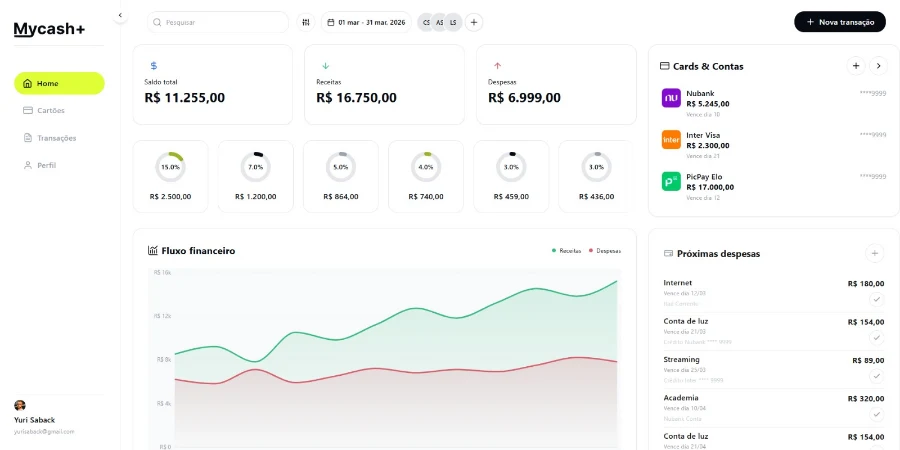 Access the live project: https://dashboard-mycash-pearl.vercel.app/
- →Complete home with financial overview
- →Card management area
- →Detailed transaction system
- →User profile administration
- →Integrated database with Supabase
- →Responsive design and token system
Expanding boundaries between design and code
This workshop was a transformative experience that allowed me to expand my skills beyond traditional design, better understanding the development process and the possibilities of generative AI.
Bridge between design and development
I understood in practice how well-structured designs facilitate code generation, and how a solid Design System is fundamental for scalable products.
Strategic use of AI in workflow
I learned to create effective prompts and configure AI tools to work as partners in the creative process, not just as code generators.
Mastering technical documentation
I installed and used Tailwind, Vite, and Supabase documentation in Cursor AI, understanding how complex tools can be democratized through AI.
Autonomy to create end-to-end products
I left the workshop with the ability to prototype, develop, and publish complete projects, reducing dependence on technical teams to explore ideas.